BRD602 ORIN GMSL Camera#
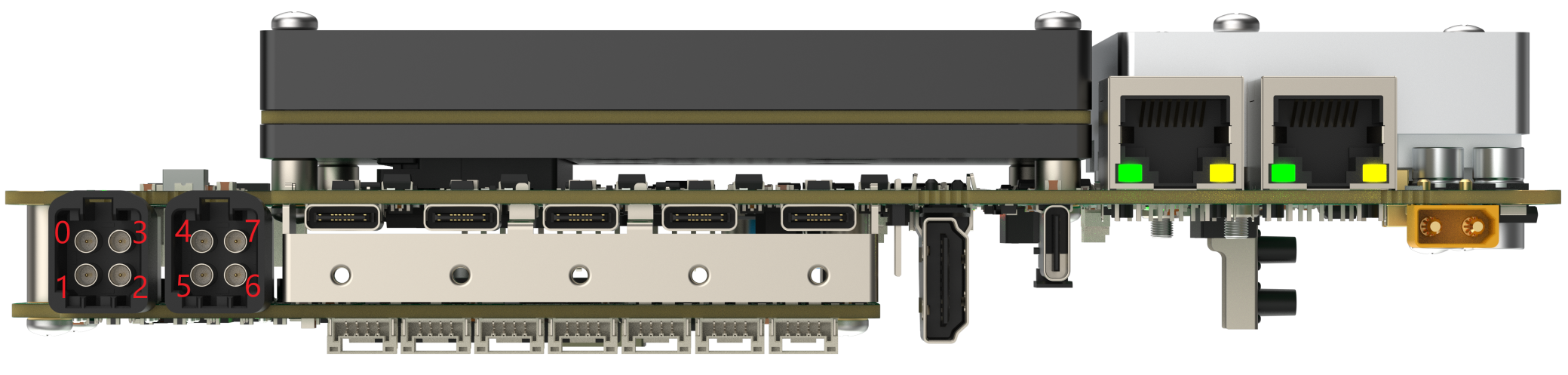
Description#
Hot-plug not supported
Support max 15 meter cable
Support resolution in 720p, 1080p, 4k
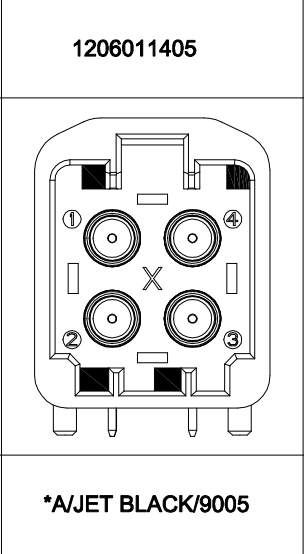
Adapter cable suggested.

Node mapping relationship#
Interface |
Device node |
|---|---|
GMSL 0 |
/dev/video0 |
GMSL 1 |
/dev/video1 |
GMSL 2 |
/dev/video2 |
GMSL 3 |
/dev/video3 |
GMSL 4 |
/dev/video4 |
GMSL 5 |
/dev/video5 |
GMSL 6 |
/dev/video6 |
GMSL 7 |
/dev/video7 |
Troubleshooting of GMSL Camera Issues#
Principle#
Miwen only ensures that the frame rate of the data obtained from the hardware interface is normal. The calculation frame rate of the program designed by the user themselves cannot be used as a standard to judge abnormalities. The commonly used tools in the industry or the standards recognized by everyone should be used for testing. It is recommended to use the v4l2-ctl command (installation command: sudo apt install v4l-utils) for frame rate testing.
Specific methods for troubleshooting#
Phenomenon 1: The camera can be turned on normally, but the image frame rate does not match the frame rate specified in the camera manual.#
Check item 1: Use the v4l2-ctl tool to verify image output#
Plug the camera into the Miwen device and correctly configure the camera model in websetting. Open the terminal and enter the command:
v4l2-ctl --verbose -d /dev/video0 --set-fmt-video=width=1920,height=1080,pixelformat=UYVY --stream-mmap
In the above instructions, if the camera resolution is 1920x1080 and the inserted camera port is video0, customers can modify them according to their actual situation.
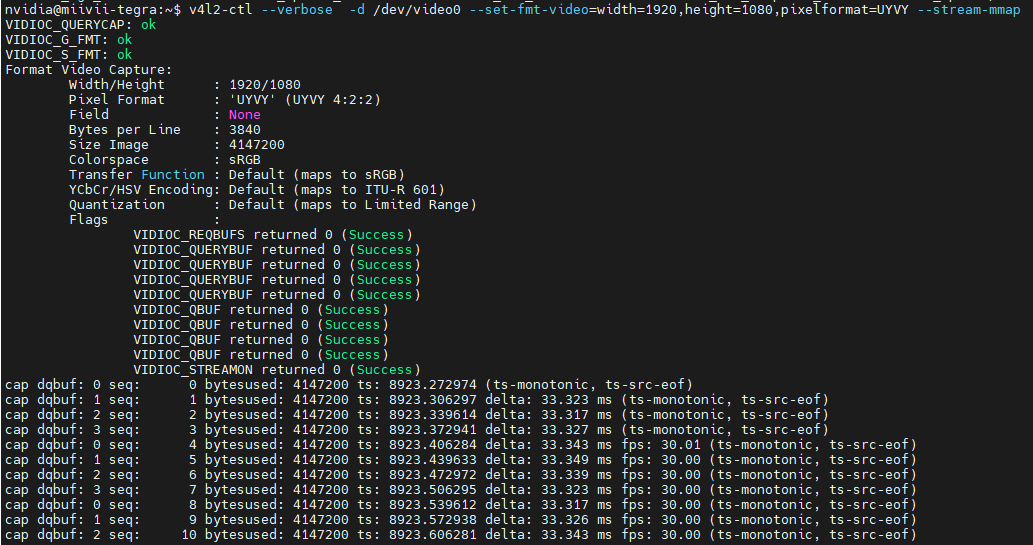
As shown in the above figure, ts: 33.327ms means the camera frame rate is 30Hz.
When executed multiple times, if the frame rate using v4l2-ctl does not match the camera manual, it is recommended that the customer communicate with the camera manufacturer to check if the firmware version is correct.
If there is a frame dropping issue, it is recommended to check the hardware link connection. If the hardware link is normal, execute “Troubleshooting Item 2: Collect log information”.
Check item 2: Capture logs#
After connecting the device to the external network, open the terminal and enter:
curl -sSL https://doc.miivii.com/scripts/run_miivii_diagnostic.sh | sudo bash -s gmsl
And export the logs and the files under /var/log, upload them to the fault work order, and hand them over to Miwen technical support.
Phenomenon 2: The camera cannot modify the frame rate#
Check item 1: Confirm whether the camera supports external triggering#
Step 1: Ask the camera manufacturer whether the camera supports external triggering.#
If external triggering is supported, execute “Check Item 2: Use the v4l2-ctl tool to verify if the frame rate has been modified”.
If external triggering is not supported, modifying the frame rate is not supported.
Check item 2: Use the v4l2-ctl tool to verify whether the frame rate has been modified#
Step 1: Same as “Troubleshooting Step 1” in “Phenomenon 1”#
If it is confirmed that the modification was not successful, then execute “Troubleshooting Item 3”.
If the frame rate matches the modified frame rate, it is necessary to check your own application.
Check item 3: Make minor adjustments to the frame rate and try to see if the modification can be successful.#
Step 1: Use sdkdemo to modify the frame rate within a small range (frame rates that differ from the default frame rate by 5 FPS or less)#
If the modification is successful, it is recommended that the customer consult the camera manufacturer about the range of frame rate modifications supported by the camera firmware.
If the modification is unsuccessful, execute “Check Item 4: Ensure that the synchronization signal of the camera is outputting normally”.
Root cause explanation:
Due to CMOS hardware limitations, even different products from the same camera manufacturer may support different frame rates for camera modifications. Here is a general distinction: all cameras that support external triggering can be referenced (distinguished by CMOS suppliers):
1 2 The minimum frame rate of OV camera’s CMOS is usually half of the default plus 1. How to identify if it is an OV CMOS? For example: The camera name contains OX08B/OX03C/OV10640 and other terms with OX/OV. 2 ONSEMI’s CMOS usually supports frame rate adjustment from 1-30FPS. How to identify if it is an ONSEMI CMOS? For example: The camera name contains AR0233/AR0820/AR0147 and other terms with AR. 2 SONY’s CMOS is quite special and has no specific characteristics. Common ones such as the IMX series usually only support fixed frame rate output (e.g., IMX390, IMX477, IMX728), while series like ISX usually support half of the default frame rate plus 1 (e.g., ISX031, ISX021).
Check item 4: Ensure that the synchronization signal of the camera is outputting normally#
Step 1: Check if the SDK is running properly#
Check if there are any error messages in the terminal.
Use sdkdemo to print timestamps and check if the triggering is normal.
If there is no error message and the timestamp is normal, it is recommended that the customer ask the camera manufacturer whether this model of camera supports modifying the frame rate.
If there is an error message, execute “Troubleshooting Item 5 - Step 2: Capture log information”.
Check item 5: Re-flash the image to verify if it is caused by the software environment#
Step 1: Flash the image#
Method for flashing the image:https://doc.miivii.com/Apex-AD10-User-Manual-CH/wiki/Apex-AD10-%E5%9B%BA%E4%BB%B6%E7%83%A7%E5%86%99.html。
After flashing the image, if the frame rate can be modified normally, it indicates that the issue is caused by the system software environment, and the customer needs to check the software environment themselves.
After flashing the image, if the frame rate still cannot be modified, execute “Step 2”.
Step 2: Capture the log#
After connecting the device to the external network, open the terminal and enter:
curl -sSL https://doc.miivii.com/scripts/run_miivii_diagnostic.sh | sudo bash -s gmsl
And export the logs and the files under /var/log, upload them to the fault work order, and submit them to Miwen technical support.