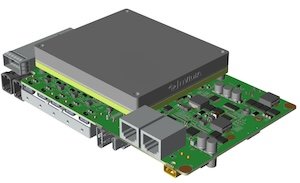
BRD601 THOR EtherCAT#
Function Description#
SOEM (Simple Open EtherCAT Master) is a lightweight open-source EtherCAT master library.
Devices based on Jetson can only function as a Master and cannot operate as a Slave.
EtherCAT Network Topology#
EtherCAT devices typically use daisy chain or bus topology:
PC (Master) ─── Device (Slave)
Connection Method:#
The PC is directly connected to the slave device via an Ethernet cable. The slave device’s Ethernet port connects to the PC’s Ethernet port (if there is an OUT port, it can be connected to other slaves). Downloading and Compiling
Source Code Package: SOEM-1.4.0.zip
# Download the source code from the GitHub repository to the device, or directly use the downloaded source code package.
git clone https://github.com/OpenEtherCATsociety/SOEM.git
cd SOEM

# Compile
mkdir build
cd build

# CMake 3.9 or later
cmake .. && make
Run the Demo Program#
# simple_test,Output similar information to indicate that the master software is running normally.
# ./test/linux/simple_test/simple_test
# SOEM (Simple Open EtherCAT Master)
# Simple test
# Usage: simple_test ifname1
# ifname = eth0 for example

# Available adapters:
#     - lo  (lo)
#     - dummy0  (dummy0)
#     - eth0  (eth0)
#     - eth2  (eth2)
#     - eth1  (eth1)
#     - can2  (can2)
#     - can4  (can4)
#     - can3  (can3)
#     - eth3  (eth3)
#     - l4tbr0  (l4tbr0)
#     - rndis0  (rndis0)
#     - usb0  (usb0)
#     - docker0  (docker0)
# End program

# Scan the slave devices connected to the master network.
# sudo ./test/linux/simple_test/simple_test eth0
# SOEM (Simple Open EtherCAT Master)
# Simple test
# Starting simple test
# ec_init on eth0 succeeded.
# No slaves found!
# End simple test, close socket
# End program

# View the slave information (ensure that the slave is connected to the corresponding interface, such as eth1).
# sudo ./test/linux/slaveinfo/slaveinfo eth1
# SOEM (Simple Open EtherCAT Master)
# Slaveinfo
# Starting slaveinfo
# ec_init on eth1 succeeded.
# 1 slaves found and configured.
# Calculated workcounter 3

# Slave:1
#  Name:CANMOTOR
#  Output size: 2048bits
#  Input size: 144bits
#  State: 4
#  Delay: 0[ns]
#  Has DC: 1
#  DCParentport:0
#  Activeports:1.0.0.0
#  Configured address: 1001
#  Man: 00000002 ID: 00020000 Rev: 00020000
#  SM0 A:1000 L: 128 F:00010026 Type:1
#  SM1 A:1080 L: 128 F:00010022 Type:2
#  SM2 A:1100 L: 256 F:00010064 Type:3
#  SM3 A:1400 L:  18 F:00010020 Type:4
#  FMMU0 Ls:00000000 Ll: 256 Lsb:0 Leb:7 Ps:1100 Psb:0 Ty:02 Act:01
#  FMMU1 Ls:00000100 Ll:  18 Lsb:0 Leb:7 Ps:1400 Psb:0 Ty:01 Act:01
#  FMMUfunc 0:1 1:2 2:3 3:0
#  MBX length wr: 128 rd: 128 MBX protocols : 00
#  CoE details: 00 FoE details: 00 EoE details: 00 SoE details: 00
#  Ebus current: 0[mA]
#  only LRD/LWR:0
# End slaveinfo, close socket
# End program  # Partial Output Information Description

# Input/Output Size:

#     Output (from Master to Slave): 2048 bits (256 bytes).
#     Input (from Slave to Master): 144 bits (18 bytes).

# Slave Status:

#     Current state is 4, corresponding to EC_STATE_OPERATIONAL (Operational State).
#     This means the slave has successfully entered the operational state in the slaveinfo program.

# Sync Manager (SM):

#     SM0 (Type 1) and SM1 (Type 2) are used for mailbox communication.
#     SM2 (Type 3): used for Output (process data from Master to Slave).
#         Address 0x1100, Length 256 bytes.
#     SM3 (Type 4): used for Input (process data from Slave to Master).
#         Address 0x1400, Length 18 bytes.

# Distributed Clock (DC):

#     The slave supports the distributed clock (Has DC: 1).

# FMMU Mapping:

#     FMMU0: maps Output data to logical address 0x0000.
#     FMMU1: maps Input data to logical address 0x0100.

# Mailbox Support:

#     Mailbox length is 128 bytes.
#     This slave does not enable protocols such as CoE, FoE, EoE, SoE, etc.
Through the above process, the basic support for EtherCAT Master on the device is completed. By using the slave and related peripheral documentation, you can develop and implement EtherCAT protocol support and control.
Verification Plan (For Internal Use)#
Connection Method#
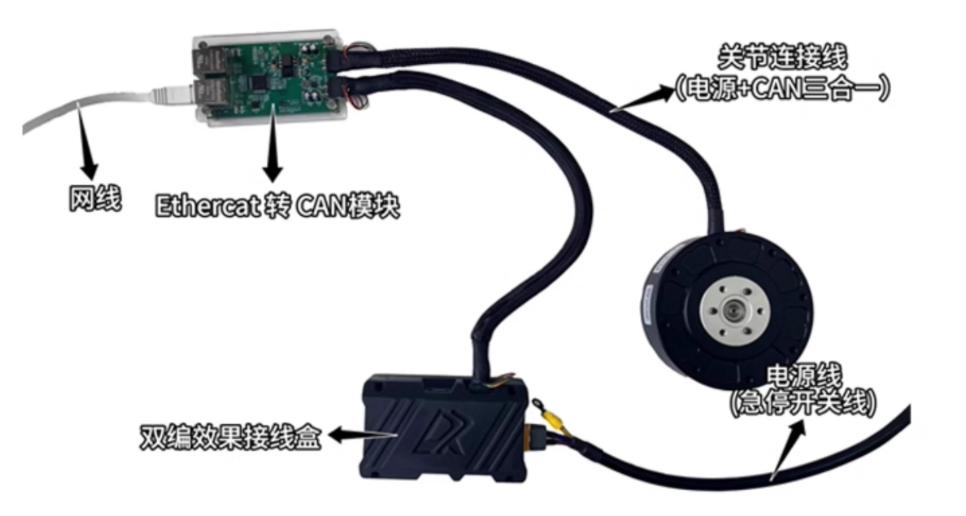
In the diagram above, the Ethernet cable is connected to any Ethernet interface of the host device, such as eth0.
Usage and Verification#
#Command 1: Start the motor rotation.
#Command 2: Stop the motor rotation.
Solution 1: Compilation
Source File: turn_on_motor.c
#Replace test/linux/simple_test/simple_test.c
cp turn_on_motor.c test/linux/simple_test/simple_test.c

#Recompile
make
Usage and Verification
#Command 1: Start the motor rotation.
sudo ./test/linux/simple_test/simple_test eth0

#Command 2: Stop the motor rotation (not currently supported).
#Please disconnect the power once the motor stops at the supported maximum angle!
Solution 2: Install deb Package#
The deb package includes SOEM-1.4.0.zip and has completed the compilation process;
The project root directory contains simple_test, slaveinfo, turn_on_motor, and turn_on_motor.c.
Deb:miivii-SOEM-1.4.0.2-arm64.deb
#Install the deb package
sudo dpkg -i miivii-SOEM-1.4.0.2-arm64.deb

#Use the following command to check if the installation was successful
dpkg -l | grep miivii-soem
使用及验证
#Command 1: Start the motor rotation.
sudo ./MIIVII-SOEM/turn_on_motor eth0

#Command 2: Stop the motor rotation (not currently supported).
Please disconnect the power once the motor stops at the supported maximum angle!