Isaac ROS Compression#
#
概述#
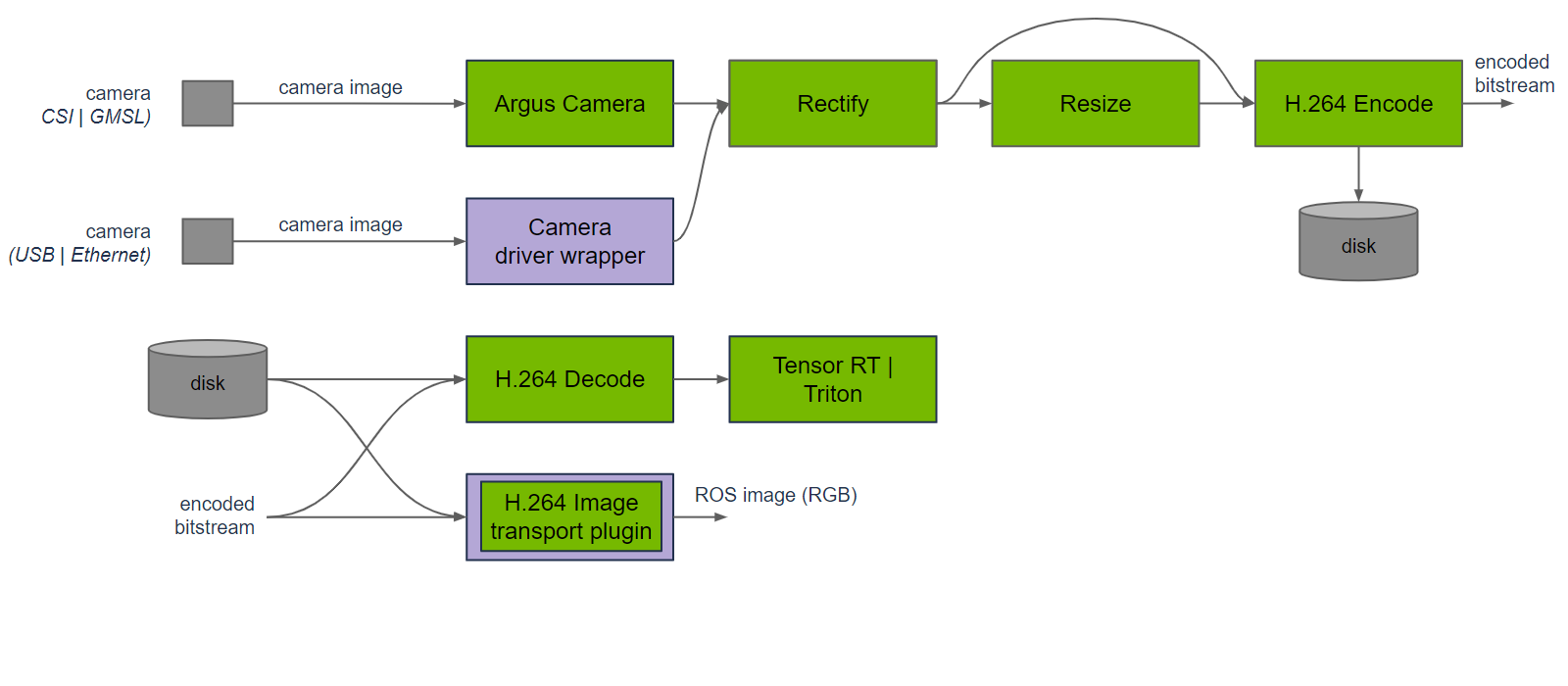
Isaac ROS Compression 提供 H.264 图像编码器和解码器,利用 NVIDIA GPU 和 Jetson 平台的专用硬件。
isaac_ros_h264_encoder 包可以使用 NVENC 将图像压缩为 H.264 数据。
isaac_ros_h264_decoder 包可以使用 NVDEC 将 H.264 数据解码为原始图像。
此包由 NVIDIA Isaac Transport for ROS (NITROS) 提供支持,通过类型适配和协商优化消息格式,并显著加速参与节点之间的通信。
isaac_ros_h264_decoder#
下载快速入门资源#
从NGC下载快速启动数据:
#确保已安装所需的库
sudo apt-get install -y curl tar

#利用以下代码从NGC下载资源
NGC_ORG="nvidia"
NGC_TEAM="isaac"
NGC_RESOURCE="isaac_ros_assets"
NGC_VERSION="isaac_ros_h264_decoder"
NGC_FILENAME="quickstart.tar.gz"

REQ_URL="https://api.ngc.nvidia.com/v2/resources/$NGC_ORG/$NGC_TEAM/$NGC_RESOURCE/versions/$NGC_VERSION/files/$NGC_FILENAME"

mkdir -p ${ISAAC_ROS_WS}/isaac_ros_assets/${NGC_VERSION} && \
    curl -LO --request GET "${REQ_URL}" && \
    tar -xf ${NGC_FILENAME} -C ${ISAAC_ROS_WS}/isaac_ros_assets/${NGC_VERSION} && \
    rm ${NGC_FILENAME}
运行启动文件#
运行以下启动文件,并使用快速启动的rosbag文件启动此包的演示:
ros2 launch isaac_ros_examples isaac_ros_examples.launch.py launch_fragments:=stereo_h264_decoder
打开第二个终端
ros2 bag play -l ${ISAAC_ROS_WS}/isaac_ros_assets/isaac_ros_h264_decoder/quickstart.bag
可视化结果#
打开一个新的终端,运行:
rviz2
#订阅/left/image_uncompressed和/right/image_uncompressed两个topic
或者:
#安装image_view
apt install ros-humble-image-view

#使用image_view验证输出
ros2 run image_view image_view --ros-args -r image:=/left/image_uncompressed
ros2 run image_view image_view --ros-args -r image:=/right/image_uncompressed
常见问题#
错误信息:
[component_container_mt-2] 2023-04-04 06:39:57.766 WARN  gxf/std/greedy_scheduler.cpp@235: Error while executing entity 20 named 'KIWPUYFVJT_decoder_response': GXF_FAILURE
[component_container_mt-2] [ERROR] (/usr/src/jetson_multimedia_api/samples/common/classes/NvV4l2ElementPlane.cpp:178) <dec0> Capture Plane:Error while DQing buffer: Invalid argument
[component_container_mt-2] 2023-04-04 06:39:57.766 ERROR /workspaces/isaac_ros-dev/ros_ws/src/isaac_ros_compression/isaac_ros_h264_decoder/gxf/codec/components/decoder_request.cpp@530: Failed to dequeue buffer from capture plane
[component_container_mt-2] 2023-04-04 06:39:57.766 ERROR gxf/std/entity_executor.cpp@509: Failed to tick codelet  in entity: KIWPUYFVJT_decoder_response code: GXF_FAILURE
[component_container_mt-2] 2023-04-04 06:39:57.766 ERROR gxf/std/entity_executor.cpp@203: Entity with eid 35 not found!
解决方法:
您可能会在解码器首先接收到P帧时看到这些错误。解码器在接收到第一个I帧之前无法解码P帧。您可以在播放rosbag之前启动解码器以避免这些错误。
ROS参数#
订阅#
ROS Topic |
消息格式 |
描述 |
|---|---|---|
image_compressed |
sensor_msgs/CompressedImage |
H.264压缩图像 |
发布#
ROS Topic |
消息格式 |
描述 |
|---|---|---|
image_uncompressed |
sensor_msgs/Image |
使用RGB8编码的未压缩图像 |
isaac_ros_h264_encoder#
运行启动文件#
RealSense Camera
ros2 launch isaac_ros_examples isaac_ros_examples.launch.py launch_fragments:=realsense_stereo_rect,stereo_h264_encoder
Hawk Camera
ros2 launch isaac_ros_examples isaac_ros_examples.launch.py launch_fragments:=argus_stereo,rectify_stereo,stereo_h264_encoder
GMSL Camera
ros2 launch isaac_ros_h264_encoder isaac_ros_h264_encoder.launch.py input_width:=1920 input_height:=1080
ROS参数#
ROS参数 |
类型 |
默认值 |
描述 |
|---|---|---|---|
input_width |
uint32_t |
1920 |
输入图像的宽度 |
input_height |
uint32_t |
1200 |
输入图像的高度 |
qp |
uint32_t |
20 |
编码器恒定QP值 |
hw_preset |
uint32_t |
0 |
编码器硬件预设类型。该值可以是0到3之间的整数,分别代表超快、快、中等和慢 |
profile |
uint32_t |
0 |
用于编码的配置文件。该值可以是0到2之间的整数,分别代表主要、基础和高 |
iframe_interval |
int32_t |
5 |
两个I帧之间的间隔,以帧数计。例如,iframe_interval=5 表示 IPPPPI…,iframe_interval=1 表示只有I帧。 |
config |
std::string |
pframe_cqp |
预设组合,包括qp、hw_preset、profile 和 iframe_interval。该值可以是 iframe_cqp、pframe_cqp 或 custom。当使用 iframe_cqp 或 pframe_cqp 时,将应用这四个参数的默认值。仅当此字段为 custom 时,才会使用自定义值 |
订阅#
ROS Topic |
消息格式 |
描述 |
|---|---|---|
image_raw |
sensor_msgs/Image |
原始图像 |
发布#
ROS Topic |
消息格式 |
描述 |
|---|---|---|
image_compressed |
sensor_msgs/CompressedImage |
H.264压缩图像 |
限制#
输入图像的分辨率必须与您提供的尺寸相同,且分辨率不得超过 1920x1200。
输入图像应该是 rgb8 或 bgr8 格式,在发送到编码器之前将被转换为 nv12 格式。
编码器可以执行全I帧或P帧编码,并输出 H.264 压缩数据。输入和输出是一一映射的。