APEX ORIN MINI SSD Usage#
SSD Installation:#
Remove the following panel fixing screws:
Front:
#

Back:#

Sides (Left/Right):#
#


SSD Installation#
Steps: 1.Attach the dedicated EVA foam to the corresponding location.

2.Install the SSD on the socket shown in the diagram, securing it with one M3*6 cross-recessed screw with adhesive.

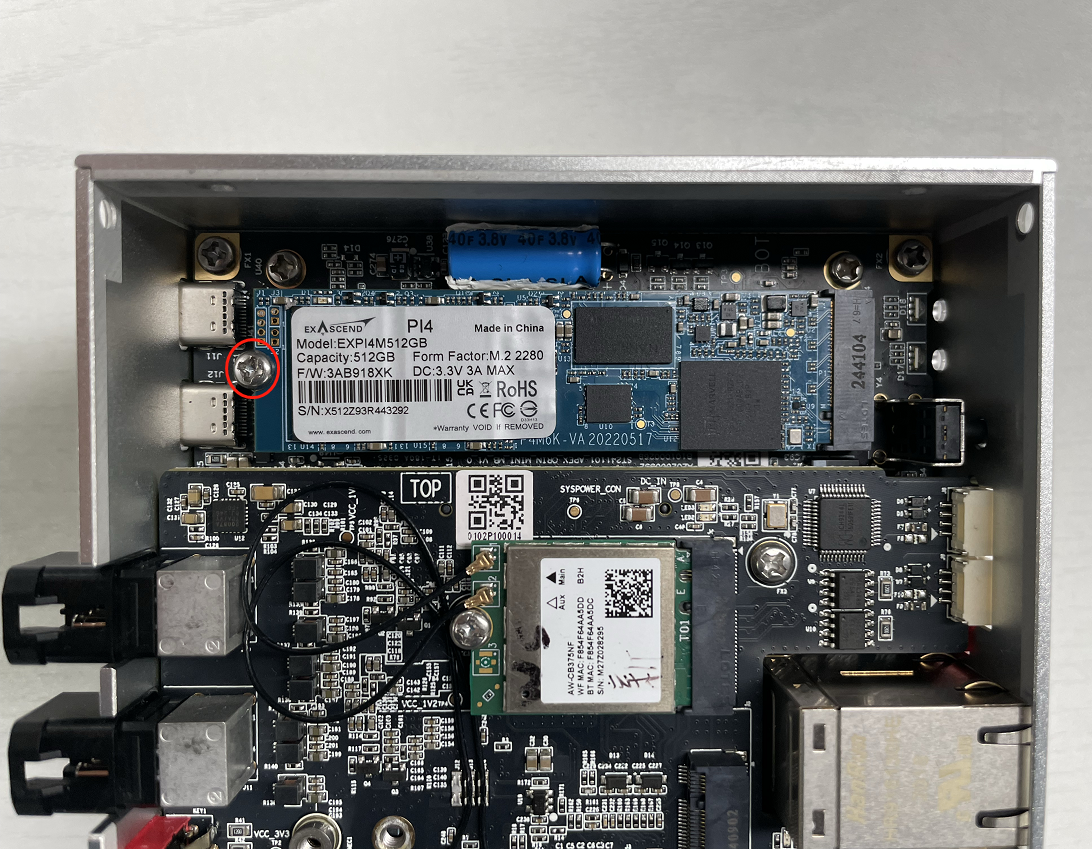
3.Apply a thermal pad on the SSD (Thickness: 2.5mm).

Required Accessories:#
SSD x1
M3*6 Cross-Recessed Screw with Adhesive x1
2.5mm Thermal Pad x1
Dedicated EVA Foam x1
Notes:#
The SSD requires a thermal pad for heat dissipation.
#
M. 2 SSD hard disk#
Check ssd information:
sudo fdisk -lu
Figure screenshot of viewing hard disk information page
Format hard disk:
sudo mkfs -t ext4 /dev/nvme0n1
Figure screenshot of formatted hard disk
View hard disk UUID:
sudo blkid /dev/nvme0n1
Figure screenshot of hard disk UUID
Setting method of automatic mounting SSD:** Create a systemd service in the /etc/systemd/system path to automatically mount the **SSD when booting, such as: miivii_mount_ssd.service
#创建服务miivii_mount_ssd.service
vim miivii_mount_ssd.service
[Unit]
Description=MIIVII specific script
After=udev.service

[Service]
ExecStart=/etc/systemd/miivii_mount_ssd.sh

[Install]
WantedBy=multi-user.target
Create a script under the path of / etc / SYSTEMd / to mount the hard disk, such as miivii_ mount_ ssd. sh
#创建服务脚本miivii_mount_ssd.sh
vim miivii_mount_ssd.sh
#!/bin/bash
mount -o rw /dev/nvme0n1 /home/nvidia/workspace
change mode for this script
sudo chmod +x miivii_mount_ssd.sh
Set the mounted SSD service to start at boot
sudo systemctl enable miivii_mount_ssd.service