APEX ORIN MINI Power On#
Before powering on the device, please confirm the following:
1 Ensure the input power is DC 9–36V. 1 Use Connection Method 1 or Connection Method 2 to connect the power supply. 1 After checking that all connections are normal, power on the device.
Connection Method 1: Use the power adapter and power extension cable provided with the device to connect to the DC power interface.
Image of Power Extension Cable
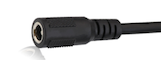
Connection Method 2: Use a custom power supply with an XT30 male connector to directly connect to the device’s XT30 interface.
#

Pin Sequence of Device XT30 Power Interface
Pin Definitions
No |
Pin |
Description |
|---|---|---|
1 |
+ |
Positive DC Power |
2 |
- |
Negative DC Power |
Hardware Specifications#
Input |
Specification |
|---|---|
DC |
9~36V |
Login to the System
The device uses the Ubuntu system. Default username: nvidia; Password: nvidia.
Soft Shutdown Command line method:
|
Soft RebootCommand line method:#
|
System SleepCommand line method:#
|
LogoutGraphical method:#

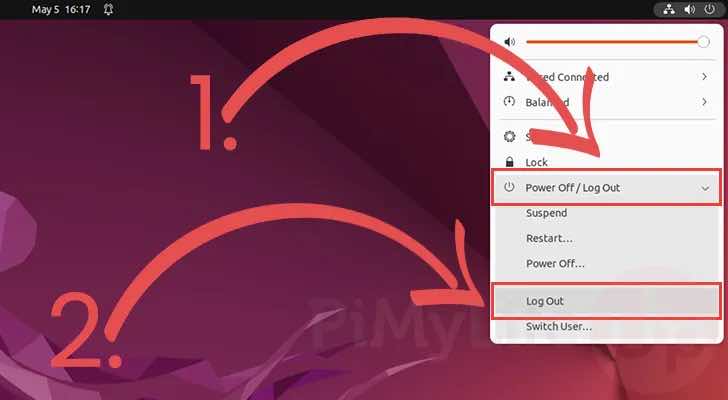
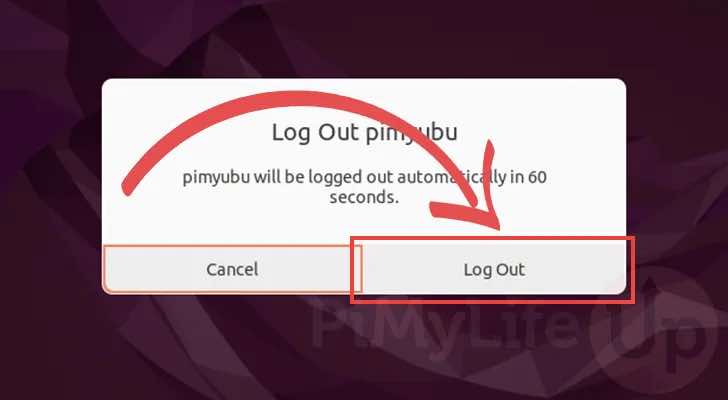
Command line method:#
|