APEX ORIN NANO GPIO Digital Output#
Hardware Connection#
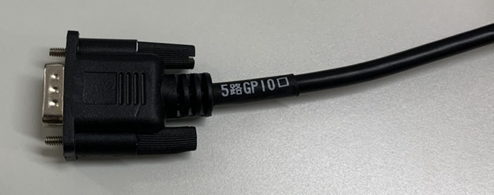
PIN Definition#
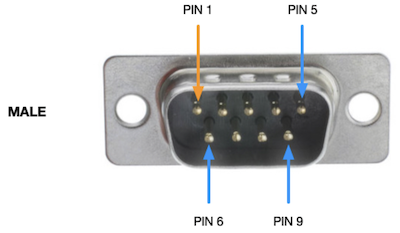
接口名称 |
DB9针脚序号 |
接口说明 |
设备节点 |
|---|---|---|---|
DI_0 |
1 |
GPIO IN |
/dev/gpio/di0 |
DI_1 |
2 |
GPIO IN |
/dev/gpio/di1 |
DO_0 |
3 |
GPIO OUT |
/dev/gpio/do0 |
DO_1 |
4 |
GPIO OUT |
/dev/gpio/do1 |
GND |
6-9 |
地 |
DO Hardware Specification#
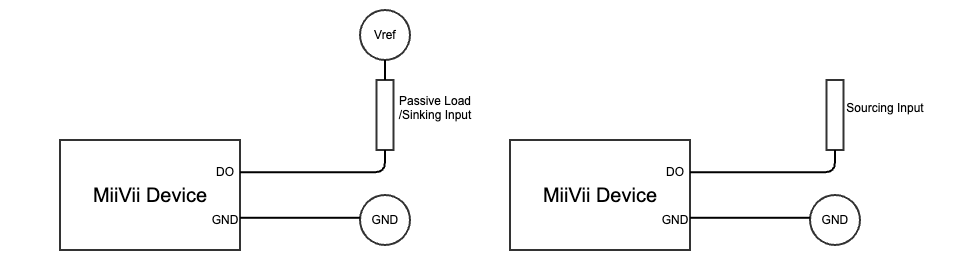
Description |
|
|---|---|
Vref |
Voltage to be supplied externally at the user side. |
Passive Load |
E.g. LED, Relay, Solenoid Valve. |
Active Sourcing Input |
Active Sourcing Input, DI of PLC, e.g. |
Specification |
|
|---|---|
Vref |
3.3~36V |
DO Usage#
The usage of GPIO is as below
sudo /opt/miivii/features/gpio/bin/miivii_set_do_level <DO number> <level: 0/1> <duration(seconds) of level>
#<DO number>: Represents the sequence number of the DO. 0 represents DO1, 1 represents DO1, and so on.
#<level: 0/1>: Represents the level to be set. 0 represents low level, and 1 represents high level.
#<duration(seconds) of level>: The duration of the level in seconds. During this period, the DO level will be in the state specified by <level: 0/1>. After the level duration is exceeded, the DO returns to its previous state.

#Please note that starting from Linux kernel version 4.8, the GPIO SYSFS interface is marked as deprecated and is no longer supported in Jetpack 6.0 and later versions. It is recommended to use libgpiod for GPIO operations. Therefore, setting the level without specifying a duration is not supported.
#Example: Set DO0 to high level with a duration of 20 seconds.
#sudo /opt/miivii/features/gpio/bin/miivii_set_do_level 0 1 20
Compile sample code
cp -r /opt/miivii/features ~/
cd ~/features/gpio
sudo make;