
APEX AD10 DO Usage#
Hardware Specification#


Electrical Characteristics#
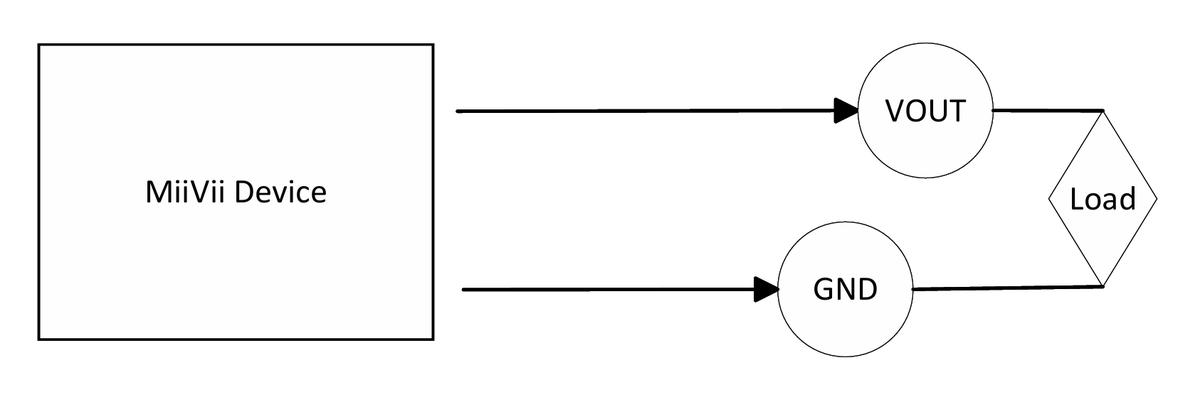
Description |
|
|---|---|
Vout |
Output voltage |
GND |
Ground |
Load |
Load |
Vout Result |
|
|---|---|
high level=1 |
3.3V |
low level=0 |
0V |
Pin Definition#
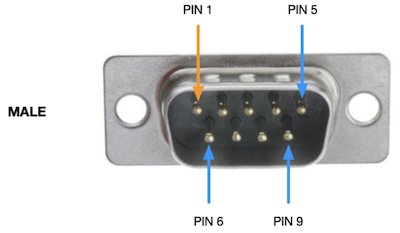
Interface Name |
DB9 Pin No. |
Interface Description |
Device Node |
Pin No. |
Datasheet Signal Definition |
Schematic Signal Definition |
||
|---|---|---|---|---|---|---|---|---|
DI_0 |
1 |
GPIO IN |
/dev/gpio/di0 |
A2 |
GPIO_1 |
GPIO1_IN |
GPIO_IN signal |
|
DI_1 |
2 |
GPIO IN |
/dev/gpio/di1 |
C2 |
GPIO_13 |
GPIO13_IN |
GPIO_IN signal |
|
DO_0 |
3 |
GPIO OUT |
/dev/gpio/do0 |
E2 |
GPIO_24 |
GPIO24_3V3 |
GPIO_OUT signal |
|
DO_1 |
4 |
GPIO OUT |
/dev/gpio/do1 |
F1 |
GPIO_26 |
GPIO26_3V3 |
GPIO_OUT signal |
|
DO_2 |
5 |
GPIO OUT |
/dev/gpio/do2 |
D1 |
GPIO_33 |
GPIO33_3V3 |
GPIO_OUT signal |
|
GND |
6-9 |
Ground |
Interface Name |
DB9 Pin No. |
Interface Description |
Device Node |
Pin No. |
Datasheet Signal Definition |
Schematic Signal Definition |
||
|---|---|---|---|---|---|---|---|---|
3路gpio |
DO_3 |
1 |
GPIO OUT |
/dev/gpio/do3 |
F4 |
GPIO_7 |
BGPIO_07_3V3 |
GPIO_OUT信号 |
DI_2 |
3 |
GPIO IN |
/dev/gpio/di2 |
E3 |
GPIO_12 |
BGPIO_12_IN |
GPIO_IN信号 |
|
DI_3 |
5 |
GPIO IN |
/dev/gpio/di3 |
F3 |
GPIO_11 |
BGPIO_11_IN |
GPIO_IN信号 |
|
Ground |
GND |
6/8 |
Ground |
Method of Application#
System version below 5.x.x-x.x.x#
The example of using the GPIO interface is as follows.
# Use root
sudo su -

# Set output to high
echo 1 > /sys/class/gpio/<device node>/value
# Example: echo 1 > /sys/class/gpio/gpio339/value

# Set output to low
echo 0 > /sys/class/gpio/<device node>/value
# Example: echo 0 > /sys/class/gpio/gpio339/value
System version above 6.x.x-x.x.x#
The usage of GPIO is as below
sudo /opt/miivii/features/gpio/bin/miivii_set_do_level <DO number> <level: 0/1> <duration(seconds) of level>
#<DO number>: Represents the sequence number of the DO. 0 represents DO1, 1 represents DO1, and so on.
#<level: 0/1>: Represents the level to be set. 0 represents low level, and 1 represents high level.
#<duration(seconds) of level>: The duration of the level in seconds. During this period, the DO level will be in the state specified by <level: 0/1>. After the level duration is exceeded, the DO returns to its previous state.

#Please note that starting from Linux kernel version 4.8, the GPIO SYSFS interface is marked as deprecated and is no longer supported in Jetpack 6.0 and later versions. It is recommended to use libgpiod for GPIO operations. Therefore, setting the level without specifying a duration is not supported.
#Example: Set DO0 to high level with a duration of 20 seconds.
#sudo /opt/miivii/features/gpio/bin/miivii_set_do_level 0 1 20
Compile sample code
cp -r /opt/miivii/features ~/
cd ~/features/gpio
sudo make;